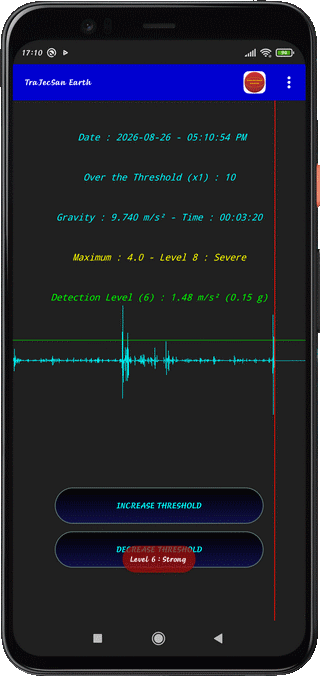
⇨ INCREASE THRESHOLD
Press to Increase the Detection Threshold (Increment 0.05)
⇨ DECREASE THRESHOLD
Press to Decrease the Detection Threshold (Decrement 0.05))
⇨ VOLUME UP
Press to Increase the Detection Threshold (Increment 0.01)
⇨ VOLUME DOWN
Press to Lower the Detection Threshold (Decrement 0.01)
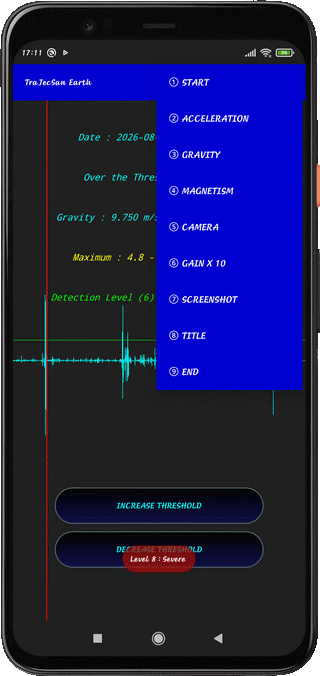
⇨ ① START
Press to Start Measurements
⇨ ② ACCELERATION
Use this quantity to monitor
⇨ ③ GRAVITY
Use this quantity to monitor
⇨ ④ MAGNETISM
Use this quantity to monitor
⇨ ⑤ CAMERA
Initialize the Camera to Record a Video
⇨ ⑥ GAIN X 10
Magnification of the Variation Image by a Factor of x10
Press a 2nd Time to return back to x1 Factor
⇨ ⑦ SCREENSHOT
Make a Screenshot in PICTURES Directory
Set the screen in Landscape Mode for a better result
⇨ ⑧ TITLE
Entering a Title
⇨ ⑨ END
Quit the Detector
⇨ ① TOUCH Application Icon on Action Bar Menu
Detailed Display of Explanations from the Support Site
⇨ ② LONG TOUCH the Screen
Light OFF / Light ON Screen
On the first Time, necessary to Accept the Tuning
⇨ ③ SOFT Touch the Screen
Reset Threshold Overrun Counter
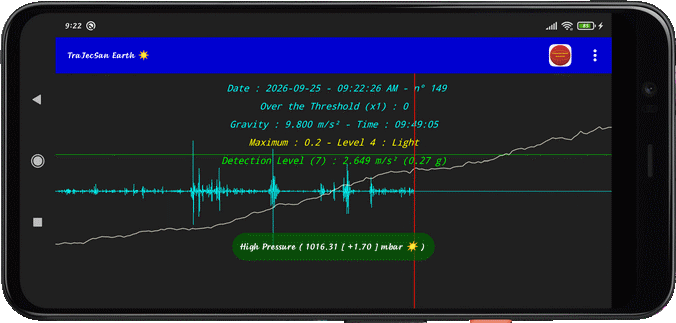
Display atmospheric Pressure and Weather Trend (Smartphone with Barometer)
⇨ ① History Length in Portrait Mode : 6 Minutes
⇨ ② History Length in Panoramic Mode : 12 Minutes
⇨ The User needs to refine the search for Critical Thresholds
for Gravity, Magnetism, and Accelerometer
⇨ TERMS OF USE
SEE the Conditions
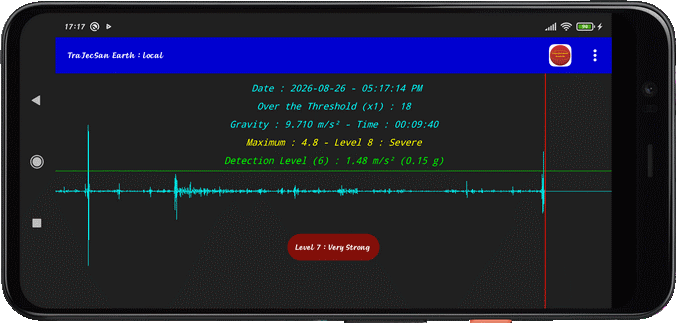
⇨ ① USING in Night Alarm :
- Launch the App
- Accept the Conditions
- Check that the System is in Gravity Mode
- Choose the desired Alarm level : for example, Level 8 SEVERE
- Place the Smartphone in a rigid and stable position
- Tap the screen lightly to initialize
- Press long the screen to put the device in Stand-By
- In case of repeated Sound Alarms, Press long the Screen to wake it up
and check the Classification indications
- Then, take the necessary steps to find shelter
⇨ ② USING in Daytime Alarm :
- At first Premisses, launch the App
- Accept the Conditions
- Check that the System is in Gravity Mode
- Tap the screen lightly to initialize
- Monitor the Classification Information
- In case of repeated Sound Alarms, check the Classification indications
- and take shelter, as soon as possible, according to the severity
⇨ ③ USING with Barometer Sensor :
- If dark Clouds, run the Application
- Accept the Conditions
- Verify if System is in Gravity Mode
- Wait for several Scans (30 Minutes to 3 Hours)
- Touch the Screen to know the Weather Trend
- Sounds heard when Scan starts :
- Alarm 3 Bips : Tornado Prevention 🌪
- Alarm 2 Bips : Storm Prevention ⚡
- Alarm 1 Bip : Rain Prevention 🌧
- Other possible states (without Alarms) : Deterioration, Stable Weather, Improving, High Pressure : ( ➘, ➝, ➚, ☀)
- Other symbol used : Predictive Phase : ∼
Help improve TraJecSan Earth by testing the latest features
Join the Test Programm